

Microsoft 365 Copilot Cowork is here – autonomous AI agents

Alian Zenn
Workplace Consultant
Microsoft 365 Copilot Cowork has been available to all eligible Microsoft 365 Copilot customers since 16 June 2026. This marks the first time Microsoft has made an AI agent widely available that not only assists with tasks but also plans, coordinates and carries them out independently. For businesses, this represents a significant step from AI assistants towards autonomous AI agents.
Copilot is generating a lot of excitement – yet many companies are still waiting for that real leap in productivity. With Microsoft 365 Copilot Cowork, Microsoft is showing the way forward: AI agents that no longer just respond, but actually get things done. Independently, contextually aware and across entire work processes.
This article explains to IT decision-makers what lies behind Microsoft’s new agent architecture from a technical perspective, what Cowork is already capable of today, and what organisational prerequisites companies should put in place for the successful deployment of autonomous AI agents.
The chat trap – why Microsoft 365 Copilot often still falls short of expectations
Expectations were high. With Microsoft Copilot, AI was supposed to noticeably lighten the workload – less routine, faster decisions, better results. In practice, however, the reality is quite different in many organisations. Copilot performs well in dialogue, but is often used only for simple tasks: summarising emails, revising texts, and formulating quick replies. Genuine process integration is often still a long way off.
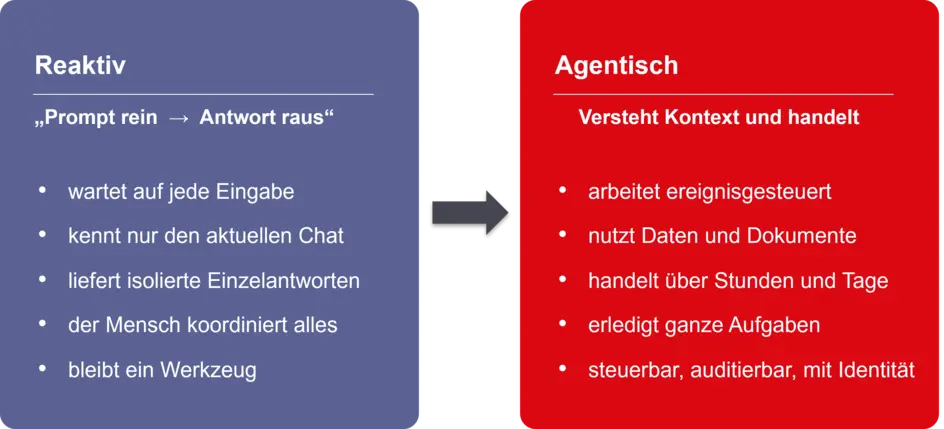
There’s a name for the pattern behind this: the chat trap. The human provides the prompt, the AI responds – and waits for the next one. Every step has to be initiated manually. This ping-pong pattern does little to lighten the workload, because someone has to take charge of the coordination. It cannot be scaled. The true potential of AI lies not in reactive responses, but in working autonomously. This is precisely the shift that Microsoft is currently making.
AI agents in Microsoft 365 – from assistants to digital colleagues
Microsoft is rethinking AI agents. Not as clever assistants who respond on command, but as digital colleagues who take on tasks independently, coordinate intermediate steps and place results within a broader work context.
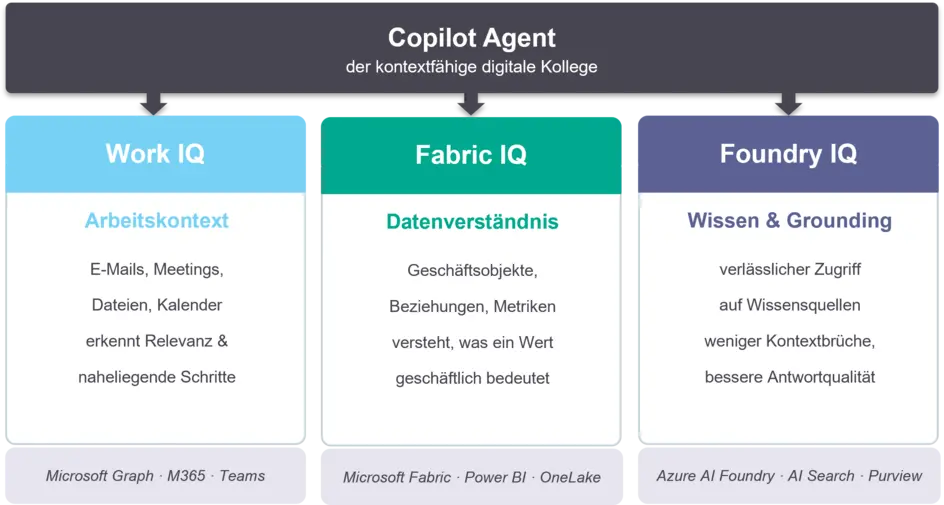
The difference is fundamental. Traditional agents are triggered by prompts and deliver individual results. Modern agents are activated by events, work autonomously for hours or days, and take your organisation’s context into account whilst doing so. Who is working with whom? Which task is urgent? What do the relevant documents, emails and meetings say? This shift requires agents to understand context, make sense of data and access reliable knowledge. Microsoft has developed three platform capabilities specifically for this purpose.
The technical foundation of Microsoft AI agents
Work IQ – the work context
Work IQ provides an understanding of how work is carried out within your organisation. This layer is built on Microsoft Graph and connects signals from emails, meetings, chats, files and calendars. This enables an agent to recognise not only content but also relevance: who is part of which project? Which task takes priority? What is the next logical step? Without this context, an agent remains generic. With Work IQ, it becomes situation-aware and works more closely in line with how your team actually operates.
Fabric IQ – understanding the data
Fabric IQ gives agents business insight – not just access to data. The layer runs on Microsoft Fabric and utilises Power BI semantic models as well as OneLake as a shared data repository. An agent no longer simply reads that a value has fallen. It understands what this means in the business context, what dependencies exist and what actions might be appropriate. Data access becomes genuine data understanding.
Foundry IQ – reliable knowledge
Foundry IQ ensures controlled access to knowledge. The layer is based on Azure AI Foundry and Azure AI Search. It brings together information from Microsoft 365, Fabric and other sources, and reliably links answers to verifiable sources – a process known as ‘grounding’. Microsoft Purview ensures that access and compliance rules are adhered to at all times.
Together, these three layers enable what individual prompts can never achieve: an agent that thinks and acts within a real-world business context.
Microsoft 365 Copilot Cowork in practice: how autonomous AI agents work
Cowork is the most comprehensive implementation to date of this new agent model in Microsoft 365. Cowork has been generally available (GA) since 16 June 2026 – billed on a usage basis and integrated directly into Microsoft 365 Copilot. Cowork runs entirely in the cloud and is also available on iOS and Android: you can delegate a task whilst on the move, and the result will be ready when you return.
The Plan-to-Action Loop – how Cowork works
The key difference from the classic Copilot is not that Cowork provides better answers. It lies in the shift from question and answer to planning and action – the Plan-to-Action Loop:
- Understand the objective: Cowork analyses the intention behind your query.
- Generate a work plan: The steps are structured and organised logically.
- Establish context: Work IQ integrates emails, meetings, files, chats and calendars.
- Execution in stages: Cowork works in the background for minutes to hours – multiple tasks can run in parallel.
- Real-time transparency: You can see every step of the process in real time. Nothing happens behind the scenes; you can intervene at any time.
- Checkpoint & approval: Every relevant action must be actively confirmed.
- Adjust at any time: You can pause, intervene or reorient the task.
The result: You retain control whilst Cowork takes care of the operational work – not as a draft that you have to implement manually, but as a completed action.
Typical use cases
- Managing your inbox: Cowork analyses incoming emails, prioritises them according to urgency and context, summarises long threads and suggests specific actions – replies, appointments, tasks.
- Processing support tickets: An incoming ticket is automatically categorised, prioritised, analysed using relevant logs and forwarded to the right team with suggested solutions.
- Preparing meeting briefings: Cowork collates calendars, previous minutes and relevant documents, and delivers a structured briefing – ready when you need it.
- Background research: Market or competitive research runs whilst you’re in other meetings. The results are presented in a structured format when you return.
- Dynamics 365 workflows: Pipeline reviews, case resolutions and order approvals directly within the Cowork workflow – without having to switch apps manually.
- Follow-up on the go: You leave a meeting and dictate the next steps via your mobile. Cowork sends the follow-up emails, creates tasks in Planner and books the follow-up appointment – all ready and waiting when you’re back at your desk.
Cowork Skills – scaling recurring tasks
Much knowledge work follows repeatable patterns. That’s exactly what Cowork Skills are for: reusable sets of instructions that capture how a task should be carried out – your structure, your tone, your process. Instead of starting from scratch every time, Cowork draws on these Skills and applies them consistently.
- Built-in Skills: Microsoft provides ready-made skills for common workflows – creating documents, coordinating meetings, structuring research.
- Custom Skills (up to 50): You define your own skills for internal processes. A concrete example: your weekly board report – structure, data sources, tone – once described, Cowork automatically delivers it every Friday. What used to take 90 minutes will now run at the touch of a button.
- Shared intelligence: Skills can be shared within the team and become a common working basis – scalable across the entire organisation.
Cowork Plugins – Integrating enterprise systems
Cowork skills can be extended using plugins. Plugins are available from the Microsoft 365 App Store or can be built as custom plugins for your own systems. They provide Cowork with specialised knowledge – for example, for financial analysis or legal research – or connect it to external data sources. Available integrations: Dynamics 365 (Sales, Customer Service, ERP), Power BI and Fabric IQ for data analysis, as well as third-party providers such as Miro, monday.com and LSEG. Particularly relevant for medium-sized businesses: custom plugins enable integration with industry-specific systems such as SAP, DATEV or Jira. Tasks that previously required switching between multiple systems and manual steps can now be completed by Cowork in a single step.
Which AI models does Microsoft 365 Copilot Cowork support?
Since the general availability (GA) release, Cowork has offered a Model Selector: you select the appropriate AI model for each task. This is more than just a technical detail – it becomes a genuine governance decision. Which model for which use case? What is the monthly cost? What are the data residency requirements? With the Model Selector, these questions fall directly within the remit of IT and compliance.
- Claude Opus 4.8 / Sonnet 4.6 / Sonnet+Opus Advisor: Standard models at general availability. Hosted by Anthropic, outside the EU data boundary. Disabled by default for EU tenants; available following a deliberate opt-in decision and documentation via Standard Contractual Clauses (SCCs).
- GPT-5.5 (Frontier, Azure AI Foundry): available to tenants with the Frontier programme enabled. Hosted on Azure AI Foundry – Microsoft’s own infrastructure, no external processing in third countries. The simplest option for EU tenants: no Anthropic sub-processor authorisation required.
- Cowork 1 (coming soon): Microsoft’s own, specially trained model. More cost-effective than Anthropic models, hosted on Azure, optimised for everyday tasks – and permanently resolves the EU issue.
Cowork remains controllable at all times. You can interact with it, check interim results or give new instructions. All actions are fully auditable. Security and compliance coverage for GA includes: audit log, Data Security Posture Management (DSPM), eDiscovery, Insider Risk Management and sensitivity labelling. Data Loss Prevention (DLP) will follow shortly.
What you need to get started:
- An active Microsoft 365 Copilot licence
- Manual activation of Cowork in the Microsoft 365 Admin Centre
- Choose a model: Claude (Standard, Anthropic authorisation required for the EU) – or GPT-5.5 via the Frontier programme (Azure-hosted, EU-compliant)
- Set up billing for credits: Pay-as-you-go ($0.01/credit) or P3 for pre-booked volume with a discount
The Frontier Programme and the future of Microsoft 365 agents
Anyone wishing to understand the direction in which Microsoft 365 Copilot is heading should take a look at the Frontier Programme. It is not a standalone product or a separate licence, but an opt-in preview channel – comparable to the Microsoft 365 Insider programmes, but focused on the latest AI and agent features. Features currently running in Frontier are gradually rolled out to general availability.
Cowork is the best example of this. From March to June 2026, Cowork was available exclusively via the Frontier programme. It has been generally available (GA) since 16 June 2026. Frontier provided early access – it was not a permanent gateway.
The Frontier programme also showcases what’s coming next: new agent types, deeper context integration and enhanced orchestration. Those active in Frontier today can get an early look at these developments and gradually prepare their own organisations.
How to enable the Frontier programme:
- Enable: In the Microsoft 365 Admin Centre, under Copilot settings, enable Frontier specifically for your tenant.
- Define target groups: You determine which users or groups will have access to Frontier features. This allows you to pilot the programme in a controlled manner before rolling it out more widely.
- Explore: New agent features are marked with ‘(Frontier)’ in the Copilot interface – this helps you keep track of what’s in preview and what’s already generally available (GA).
Microsoft Copilot Governance: Identity, compliance and control for AI agents
As agents become increasingly autonomous, the demands on structure and control grow. Anyone introducing Cowork today should consider the organisational framework from the outset – not just after the pilot.
Microsoft Agent 365 (GA since May 2026) is the central management layer for agents within the organisation. It provides an inventory of all agents in the tenant, establishes clear identities via Microsoft Entra Agent ID, and enables comprehensive audit logging as well as integration with Microsoft Defender and Purview. Important: Agent 365 is not an agent development toolkit – that is the role of Copilot Studio and Microsoft Foundry. Agent 365 is the governance layer that ensures control, visibility and accountability.
The sponsor principle ensures that every agent has a human sponsor. This prevents uncontrolled proliferation – agents being created without clear accountability.
Recommendation for getting started:
- Start with one or two clearly defined use cases. Define the input, expected output and measurable benefits in advance.
- Involve IT and compliance right from the start – not just after the prototype has been built.
- Choose the pilot group carefully: proximity to the task, a digital way of working and trust within the team are more important than prior technical knowledge.
Conclusion: The technology is ready – now it’s up to the organisation
Microsoft 365 Copilot Cowork demonstrates how Microsoft 365 agents and Agentic AI concepts are evolving from mere chat assistants into productive digital colleagues. The technical foundation is in place: Work IQ, Fabric IQ and Foundry IQ provide agents with the context, data understanding and access to knowledge they need. Cowork utilises precisely this – and has been available to all Microsoft 365 Copilot customers since June 2026.
The next step does not lie in the technology. It lies in the question: Which tasks will you hand over? Which processes are suitable for an autonomous co-worker? And what governance does your organisation need for this? Those who address these questions early on lay the groundwork for AI to become a real driver of productivity – not just a nice tool.
How we can support you:
- We help you to realistically assess your current situation and identify meaningful use cases for Copilot and agents.
- Together, we assess readiness, governance, compliance, organisational requirements and the selection of suitable pilot groups.
- With our Microsoft 365 Copilot Assessment, we guide you through a structured process – from the initial assessment right through to clear recommendations for the next steps.
- Through practical Copilot training, we empower business units, managers and IT teams to use the new capabilities confidently and productively.
Would you like to introduce Microsoft 365 Copilot, AI agents and Cowork securely and in a structured manner within your organisation? With our Microsoft 365 Copilot Assessment, we assess readiness, governance, compliance and suitable pilot use cases.
Microsoft 365 Copilot Assessment
Overview of Copilot training courses
Frequently Asked Questions about Microsoft 365 Copilot Cowork
What is Microsoft 365 Copilot Cowork?
Microsoft 365 Copilot Cowork is an AI agent within Microsoft 365 that can independently plan, coordinate and carry out tasks. Unlike the standard Copilot, Cowork does not just respond to individual prompts, but takes charge of entire workflows.
What is the difference between Microsoft Copilot and Cowork?
Microsoft Copilot supports individual tasks and responds to instructions via prompts. Cowork, on the other hand, functions as an AI agent: it plans work steps independently, accesses relevant information and carries out tasks in the background.
In short: Copilot helps with individual tasks, whilst Cowork can coordinate and execute entire workflows. Users retain control over approvals and decisions at all times.
What licence is required for Cowork?
An active Microsoft 365 Copilot licence is required to use Copilot Cowork. In addition, Cowork must be activated by an administrator in the Microsoft 365 Admin Centre, including usage-based billing (Copilot Credits).
Is Microsoft 365 Copilot Cowork GDPR-compliant?
GDPR compliance depends, amongst other things, on the chosen model and individual governance settings. Organisations should, in particular, review data residency, compliance requirements and any processing in third countries.
Can Cowork be connected to SAP, DATEV or Jira?
Yes. Cowork can be connected to numerous business systems via plugins and custom integrations. These include standard integrations as well as industry-specific applications.
For which tasks are AI agents particularly well-suited?
They are particularly well-suited to recurring knowledge-based tasks such as meeting preparations, email processing, support processes, research, reporting tasks and standardised approval workflows.