

Deactivating NTLM: Why Kerberos is important for all Active Directory environments

Uwe Grohne
Senior Solution Architect
Microsoft has extended and continued its roadmap for switching off NTLM in Windows systems. Although the final removal of the insecure authentication protocol is still a long way off, the next steps will further increase security in environments. However, IT departments are required to take concrete measures.
Most IT administrators in Windows environments are familiar with the terms NTLM and Kerberos. Both describe methods that users use to authenticate themselves to Windows systems. While NTLM generally works simply, Kerberos offers a significantly higher level of security. However, Kerberos also requires significantly more effort to set up in many situations.
For many, however, this is where the detailed knowledge ends. Authentication protocols are fundamentally complicated and as long as they work, everything is fine. Administrators usually only delve deeper into the protocols in complex scenarios such as double-hop. A classic example is the transfer of login data from the client via an application server to the SQL server. Then you try the implementation with the help of instructions and trial & error until it works. Whether it really works or whether the system falls back to NTLM is usually not checked.
The problem
NTLM has been a known security risk in Windows environments for many years, as it makes attacks easy. The lack of mutual authentication favours forms of attack such as replay attacks, brute force or man-in-the-middle attacks.
Microsoft therefore labelled NTLM as "deprecated" in mid-2024 and has already removed most of NTLMv1 from Windows 11 and Windows Server 2025. However, some residual components are still included and are used, for example, for MS-CHAPv2 for VPN connections.
NTLMv2 will remain a functional component for the time being. However, this availability should not obscure the existing security risks, as Microsoft has also initiated the standard deactivation for this version.
The farewell to NTLM
In January, Microsoft announced in a blog post that the end of NTLMv2 is also approaching. But the farewell will not be sudden, as the initial aim is to deactivate NTLM by default:
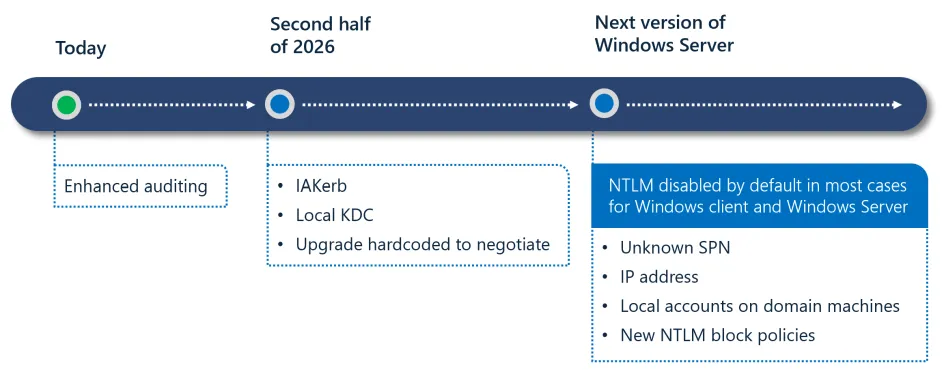
Microsoft is initially adding Enhanced Auditing to the toolset over the course of the second half of the year so that you can precisely identify applications that use NTLM. The event logs will show you the exact causes for each fallback to NTLM, such as the use of IP addresses or missing service principal names.
NTLM will only be deactivated by default with the next Windows Server version. It will therefore still be on board if it is required. However, we strongly advise against continuing to use NTLM for the security reasons mentioned above.
Special feature NTLMv1: Things will get serious this year!
As described above, NTLMv1 is only active in special scenarios such as MS-CHAPv2 (VPN, WLAN), older devices such as multifunction printers, NAS and operating systems (e.g. XP, 2003).
Microsoft has already prepared the deactivation in Windows 11 and Windows Server 2025. There is a new registry key "BlockNTLMv1SSO" under HKLM:\SYSTEM\CurrentControlSet\Control\Lsa\msv1_0. With the value "0", the audit mode is active, which logs NTLMv1 requests with the event IDs 4024. With a value of "1", block mode is active and generally rejects these requests. ID 4025 is logged in the event log.
How do I find out where NTLM is still in use?
An older blog article from Microsoft describes how to switch on auditing.
Web applications that are used via an alias instead of the server name usually use NTLM, as no service principal names are defined. The same problem often occurs with SQL servers if the installer was unable to perform the Kerberos configuration correctly.
How do I configure Kerberos for an application?
The use of Kerberos requires correctly configured Service Principal Names (SPN). These names must be stored directly in the service account of the respective application. Only then can the domain controller (DC) encrypt the tickets correctly. However, it is not always so easy to find the right service account. Ultimately, it depends on which process receives the ticket for decryption. With the IIS web server in particular, the kernel mode authentication that is active by default must be taken into account here, which ensures that the process running under the system context receives the ticket. Otherwise, the application pool for the respective application receives the ticket.
Of course, it is easiest if there are instructions from the manufacturer on how to configure Kerberos. Ideally, however, you should also know what the individual steps actually do. This is the only way to securely rectify errors or adapt the instructions to your own circumstances.
Is the application 100% secure with Kerberos?
In principle, Kerberos is already more secure than NTLM. However, the crux often lies in the detail. This is because the "Negotiate" value is often found in the authentication settings. This means that the client and server negotiate the protocol themselves.
Attackers can provoke a targeted protocol fallback as long as NTLM remains active in the network. The server then uses the insecure NTLM procedure instead of enforcing the more secure Kerberos authentication. Despite its conceptual superiority over NTLM, the Kerberos protocol is no guarantee of absolute security. Administrators have to deal with specific attack vectors such as pass-the-ticket, golden and silver tickets as well as Kerberoasting or delegation attacks. Various technical countermeasures are required to minimise these risks:
- KRBTGT Password Rollover
- Deactivate insecure encryption (RC4) or enforce secure encryption
- Use managed service accounts
- Strong passwords for service accounts or password rotation
- Only use constrained delegation
- Monitoring via security tools (e.g. Defender for Identity and Endpoint)
How can I ensure that all necessary measures have been taken?
The deactivation of NTLMv2 by Microsoft is a necessary step towards hardening modern Active Directory environments. However, this process requires a precise analysis of the existing infrastructure in order to avoid system failures. The time window until the standard deactivation in the next Windows Server version should be used to clean up NTLM dependencies and proactively address known security problems with Kerberos such as Kerberoasting or delegation attacks. This means you are already prepared for the next Windows Server upgrade and can tick the migration checklist beforehand.
Conclusion: Setting the strategic course for secure authentication
The implementation of these measures requires a deep understanding of Windows authentication procedures. If you need support in identifying NTLM dependencies or securing your Kerberos configuration, our experts will be happy to assist you with these steps:
- Infrastructure audit: we carry out a detailed analysis of your environment and identify critical NTLM fallbacks.
- Hardening the environment: Our experts support you with the configuration of AES encryption, gMSAs and constrained delegation.
- Managed security: We offer continuous monitoring of your authentication processes via Microsoft Defender for Identity as part of a managed service.
Ensure that your services remain functional even without NTLM. We support you in identifying hidden protocol fallbacks and hardening your Kerberos configuration. Contact us now for a targeted analysis of your authentication infrastructure.