

From Solaris to the cloud: lessons from a real Informix migration
Andrew Curry explains how Claranet’s Informix experience helps firms cut cost by tuning SQL, storage and workloads before scaling infrastructure.
This is the story of how we migrated a critical Informix database for a large organisation relied upon by millions of people each day, moving it from ageing Solaris hardware onto a modern cloud platform with reduced risk and a more sustainable operating model.
Every infrastructure team eventually meets the system that requires careful handling.
It powers something critical, it's been running for years, and some operational knowledge is embedded in scripts and long-standing processes. Somewhere on a production server there's a shell script that opens with # DO NOT MODIFY THIS SCRIPT. Right underneath, in case the message wasn't clear, sits a second comment: # SERIOUSLY.
For one of our customers, that system was an Informix estate running on ageing Solaris hardware. It had worked reliably for years, but the platform underneath was becoming increasingly difficult to support and evolve.
This is the story of moving it to AWS, upgrading the database in the process, and what we learned along the way. If you're staring down a similar migration, you'll recognise most of it.
The starting point
The estate was stable, reliable, and very old. It looked like this:
- Informix 12.10.FC12XA
- Solaris and SPARC database nodes
- No native database replication
- Disaster recovery handled through Level-0 backups
- Traditional, manual operational processes
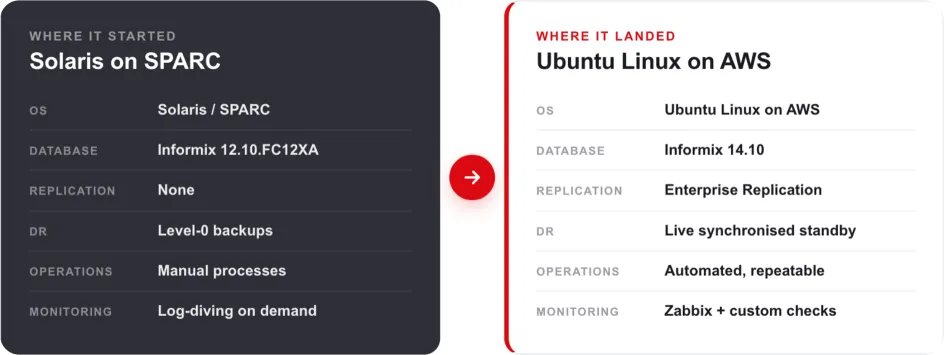
Figure 1: Before and after, at a glance. The starting estate alongside what it became after the migration.
There was nothing wrong with the design for its time. The challenge was that the platform had reached the point where supportability, resilience and future change needed to be addressed.
The brief was the kind that sounds straightforward in a planning meeting:
- Move from Solaris and SPARC to Ubuntu Linux on AWS
- Upgrade Informix from 12.10 to 14.10
- Reduce downtime
- Improve performance
- Introduce proper monitoring and automation
- Keep rollback options available throughout
- Avoid panic
Easy, in the same way rebuilding an aircraft engine during turbulence is easy.
Why Enterprise Replication earned its keep
The hardest question in any database migration is the same one every time. How do you move large volumes of live data without taking the business offline for hours?
For this estate, the answer was Informix Enterprise Replication, or ER. It rarely gets the credit it deserves.
The traditional approach can mean accepting an extended outage window and elevated cutover risk, then bringing services back online and validating that everything still behaves as expected.
ER let us do something far calmer. We could:
- Build the new environment in parallel
- Continuously replicate live transactions across to it
- Validate the new platform under realistic conditions
- Cut applications over inside a much smaller outage window
- Retain a tested rollback route if anything misbehaved
That last point mattered more than anything else. With ER still running, the old environment stayed alive and synchronised. If something broke after cutover, we could point applications back at the legacy estate and investigate in a controlled way, without relying on a slower restore-led recovery route or escalating into a high-pressure recovery scenario.
Rollback you trust changes the entire emotional shape of a migration.
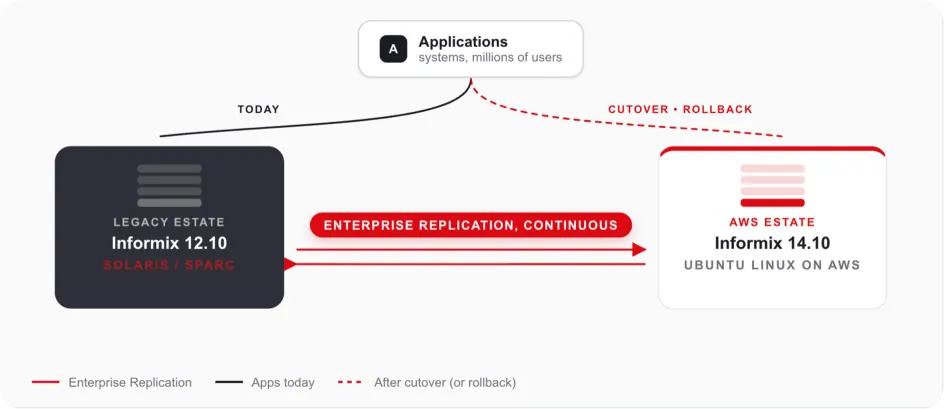
Figure 2: Both estates stay alive and synchronised. Cutover and rollback were both planned, rehearsed activities rather than unknowns.
The hidden challenge: every table needs a key
Of course, ER comes with rules. The biggest one is simple to state and painful to discover late.
Every replicated table must have a reliable unique key.
Which sounds obvious, until you find a table created sometime around 2007 with no primary key, no unique index, several million rows, and three columns called code, type, and misc. At that point the database team enters what can only be described as detective mode.
A surprising amount of preparation went into:
- Validating schema consistency across the estate
- Ensuring replication keys actually existed where they needed to
- Identifying legacy design issues that would block ER
- Cleaning up fragmentation
- Spotting refactoring opportunities while we had the chance
Migrations are rarely just migrations. They're also the one moment when fixing years of accumulated technical debt becomes a priority, because migration activity already has senior visibility and the right people are focused on the platform.
Refactoring while we were in there
Copying an old database onto a new server is a missed opportunity. Moving to AWS gave us a chance to modernise properly.
Better dbspace layouts
Tables were reorganised into more appropriate dbspaces based on how they actually behave:
- Small rows went into smaller page sizes
- Wide rows moved into bigger dbspaces
- Large tables were laid out for better parallel throughput
The database equivalent of finally organising the garage properly.
Serial to BigSerial
Every busy system eventually has the "wait, are we running out of IDs?" meeting, and it's never a good one. Serial columns were reviewed and upgraded to BigSerial where it made sense. Future-proofing is far less stressful than emergency downtime.
Extent resizing
Years of growth had left many tables with multiple extents scattered around. The goal was simple:
- Larger contiguous extents
- Fewer fragmentation issues
- Better I/O behaviour
- Faster scans
Or, in plain English: stop making the storage subsystem work harder than it has to.
AWS tuning
Moving from Solaris hardware to AWS changes how the database behaves at almost every layer. The tuning work covered:
- I/O scheduler optimisation
- HugePages configuration
- Shared memory tuning
- CPU VP adjustments
- Cleaner logical log handling
- Replication-specific configuration
And, naturally:
vm.swappiness = 10Every Linux database engineer eventually develops strong opinions about swapping. Ours are no exception.
The Ubuntu build
This is less glamorous than people think, and nobody writes exciting conference talks about kernel parameters, but database performance lives or dies by them.
The new Ubuntu servers received a carefully tuned setup:
- Shared memory adjustments
- Semaphore tuning
- HugePages configuration
- Multipathing
- Raw device ownership rules
- Logical Volume Manager tuning
- Deadline I/O scheduling
- Informix-specific environment layout
There's something quietly satisfying about a clean Informix layout. Everything in its right place:
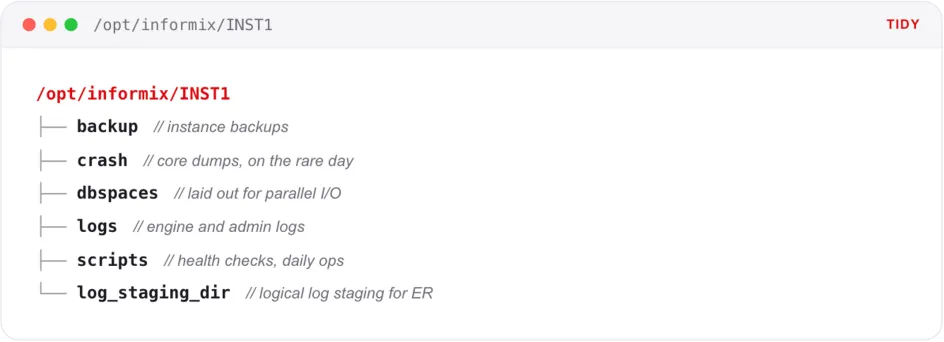
Figure 3: A clean Informix layout, with everything in its right place.
Monitoring, because "it seems fine" isn't a strategy
One of the biggest improvements in the new platform was visibility. The old world of periodic log checks was replaced with something more systematic and observable.
Zabbix went in alongside custom Informix health checks, performance collection scripts, checkpoint tracking, automated alerting, historical metrics, and full database diagnostics.
The platform now continuously watches:
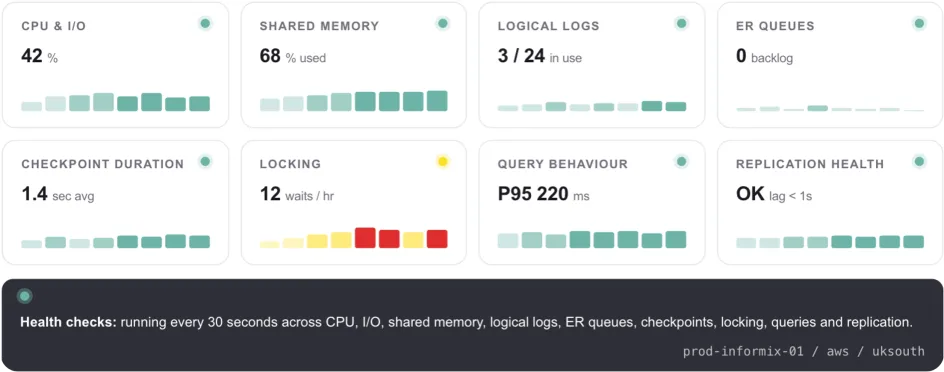
Figure 4: What the new platform watches. Visibility turned periodic checks into a continuous, attributed picture of database health.
- CPU and I/O behaviour
- Shared memory usage
- Logical and physical logs
- Checkpoint duration
- Long-running transactions
- ER latency
- Backup status
- Instance health
That last one matters. Monitoring does not make migrations exciting, but it does make them survivable. You cannot tune what you cannot see, and you cannot reassure a customer with "probably fine".
How the migration actually ran
The actual migration was rehearsed several times. That is the unglamorous truth behind most successful cutovers. By production day, the sequence was boring in the best possible way.
Step 1: Snapshot production
We took a clean Level-0 archive from production and used it as the baseline.
Step 2: Bulk data transfer
Data was moved across to AWS as efficiently as possible using parallel copy processes.
Step 3: Rebuild and validate
Once the data landed, everything was restored to its original state. Indexes were rebuilt, constraints applied, and statistics updated.
Validation was performed using the CDR check and repair functions in Enterprise Replication, running in parallel across each table. This quickly identified inconsistencies and automatically repaired missing or out-of-sync rows, avoiding the need for manual investigation.
Row counts were then compared until both sides matched exactly. This was the point where confidence in the migration started to return.
Step 4: Enable Enterprise Replication
Once the baseline was in place, ER was enabled to synchronise ongoing changes from the legacy platform to the new one.
Step 5: Validation and performance testing
The new platform was tested, tuned, tested again, and compared with the source estate until everyone had confidence in the cutover plan.
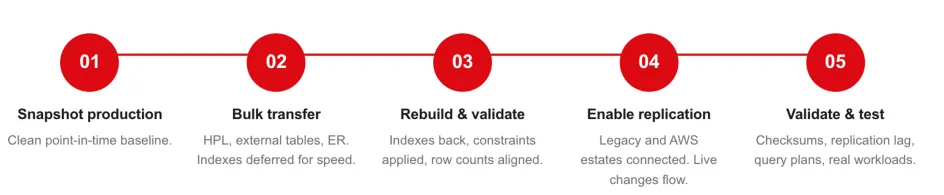
Figure 5: The migration in five steps. Each one was rehearsed several times before production day.
Lessons worth taking with you
A few lessons stood out.
First, replication changes everything. If you can keep two estates live and synchronised, your migration stops being a cliff edge and becomes a controlled transition.
Second, old platforms hide old assumptions. Table keys, extent sizes, page sizes, scripts, paths, environment variables, and backup routines often encode years of institutional memory. Find them early.
Third, cloud is not automatically faster. AWS gives you excellent primitives, but Informix still needs tuning. Storage, memory, CPU VPs, logs, and kernel settings all matter.
Fourth, rehearsals are not optional. The time to discover a missing library, broken script, or unexpected schema issue is not during the production outage window.
Finally, rollback has to be real. Not theoretical. Not "we have a backup somewhere". Real rollback means you know exactly how to go back, how long it takes, and what state the data will be in.
What actually improved afterwards
The migration did not just move the database. It changed how the platform behaved operationally.
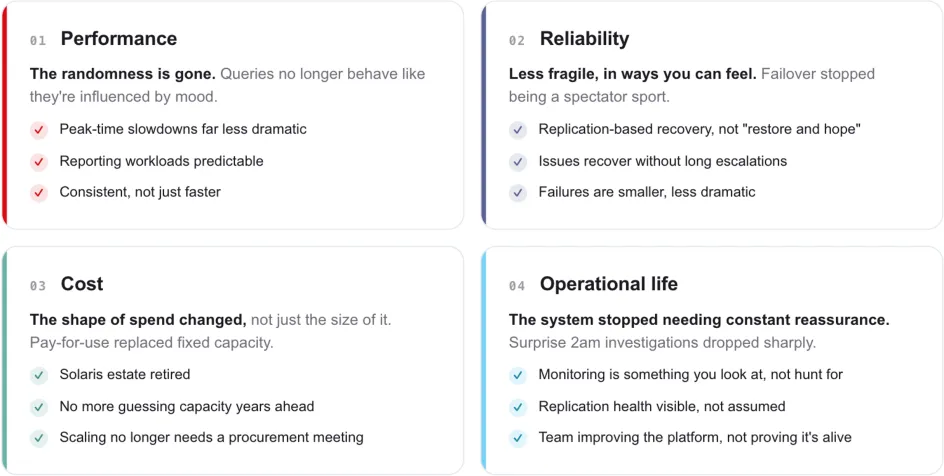
Figure 6: Four things that genuinely felt different. Performance, reliability, cost, and operational life all moved in the same direction.
Performance
The platform gained the benefit of modern infrastructure, cleaner dbspace design, better I/O behaviour, and properly tuned Linux hosts.
Reliability
Replication, monitoring, alerting, and improved operational visibility all reduced the amount of guesswork involved in keeping the platform healthy.
Cost
Moving away from ageing Solaris and SPARC infrastructure reduced dependence on specialist legacy hardware and the support model that comes with it.
Operational life
The customer gained a more maintainable platform, a supported database version, and a cleaner path for future change.
The takeaway
The technical story is that we moved Informix from Solaris and SPARC to Ubuntu Linux on AWS, upgraded it from 12.10 to 14.10, introduced Enterprise Replication, improved monitoring, tuned the platform, and reduced operational risk.
The human story is simpler.
A critical system that required careful handling became a platform the customer could understand, monitor, operate, and evolve.
That is the real value of this kind of migration. Not just cloud. Not just newer software. Not just lower cost.
Confidence.
Sitting on an ageing database estate?
If you have a business-critical database running on ageing infrastructure, you are not alone. Solaris, AIX, HP-UX, Informix, Oracle, DB2, and other long-lived platforms are still quietly powering important systems across the UK.
The details differ, but the challenges tend to rhyme.
If you're staring at a database estate that needs to move, whether that's a version upgrade, a platform migration, a move to the cloud, or all three at once, we'd be glad to help you think it through. We've done this kind of work for organisations where downtime isn't an option and the data really matters.
Get in touch and we'll talk through what a migration could look like for your environment.