

Build your MCP server in just 5 minutes using vibe coding with Kiro
In this blog, we'll show you how to create a Model Context Protocol (MCP) server with special assistants: Kiro and Sonnet Claude. ✨
But what is this new term? MCP. Is it a buzzword? I don't know, but recently it is has been very discussed recently.
So, let's dive into the MCP concept.
MCP: a new protocol by Anthropic
I'll start by showing right away the schema of the MCP Protocol:
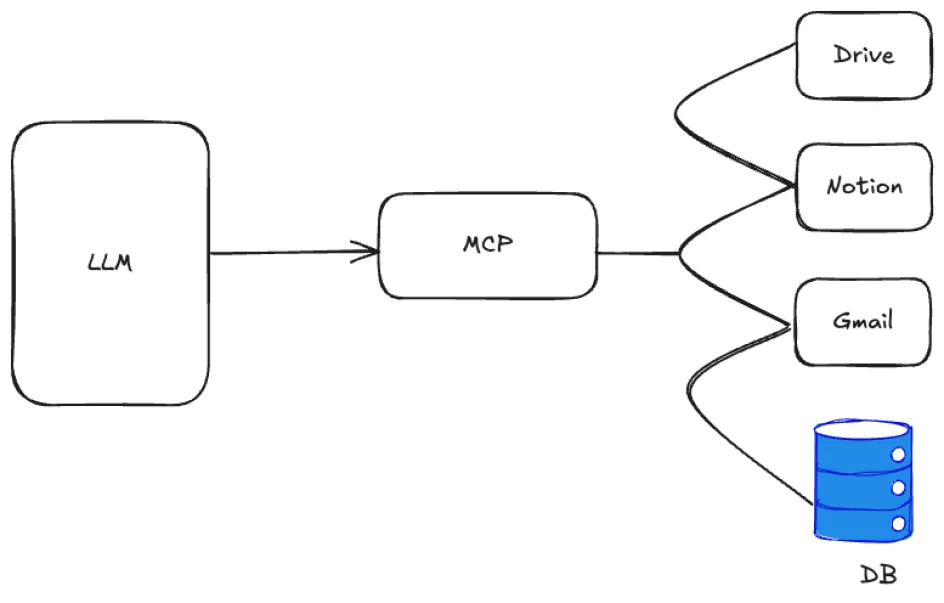
With this protocol, we can connect our AI applications to the world.
We can imagine this protocol like a USB port to connect the LLM to other services, like Gmail, Notion, Obsidian, Drive or more simply a DB or API service, with a unique standard. This is the work done by Anthropic.
Now let's take a closer look at how it fits together:
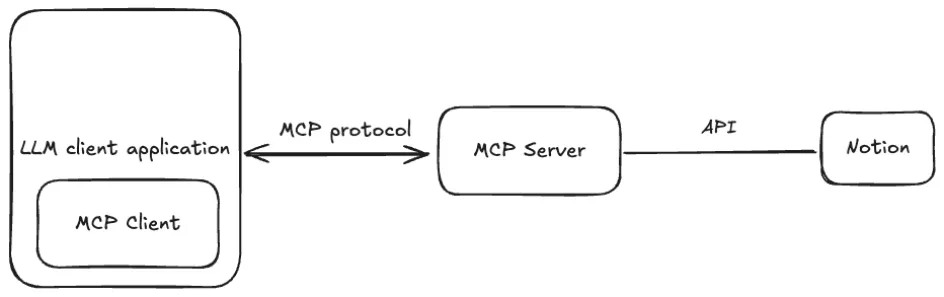
As you can see, the MCP is a layer that simplifies the communication between LLM and another service.
Let's use a real scenario
Over the last year, while focusing on my diet and gym regime, I've wanted to know more about what I eat and the nutrients in food. There are a ton of mobile applications to search for foods and get more info about them, but I'd like to search with more flexibility using natural language, for example, in a specific dataset when I'm using an AI client like Claude. The MCP protocol provides the right underlying technological connector to make this happen. We can ask, for example: "I ate two organic eggs from Carrefour", and I'll expect a response with nutritional information. Great, but how?
Use vibe coding to create our MCP Server
Following David Gillette's book, we have to use the code vibe formula:
$Vibe = (Project Soul + Your Intuition + Model's Character)$The first part - Project Soul - is the what and why of our project. The second part - Your Intuition - is our unique contribution as a human creators. It's our gut feeling, our creative spark, our accumulated experience. The third is about understanding the specific AI model we are working with, or the Model's Character.
With this information, we can use Kiro's agent to address it to create our MCP Server. Here is an example:
1) Project Soul — What & Why

        Goal: build an MCP Server that communicates with the dataset and APIs of Open Food Facts. The server should receive requests from an MCP Client and fetch food-related information directly from the official API (ingredients, nutrition facts, allergens, categories, brands), never generating or hallucinating data.

        Why: this enables AI systems to integrate verifiable, real-world food data in a reliable and traceable way.

        Expected outcome: an MCP implementation with well-defined tools that can search, filter, and retrieve products, always returning source: "openfoodfacts:".


2) Your Intuition — Human Spark

        Keep the architecture clean and modular: separate the MCP protocol layer from the connectors to Open Food Facts.

        Define strict JSON Schemas for inputs and outputs of all tools so Claude Sonnet can safely orchestrate the calls.

        Add support for language localisation (lang), since Open Food Facts is multilingual.

        Implement lightweight caching to avoid redundant API requests.

        Provide clear error messages, always including a hint field to guide the client in correcting invalid inputs.

        Code style requirement:

        Do not use class constructors.

        Use const declarations and arrow functions for all functions, exports, and callbacks.

        Prefer functional composition over OOP patterns.

        Use Typescript for entire project.


3) Model’s Character — Who You Are

        Model to use: Claude Sonnet.

        Character traits:

        excels at producing structured, logical, and safe outputs;

        prefers explicit schemas and typed definitions;

        skilled at summarising without losing precision;

        acts as a connector to the API, not as a data source.

        Constraint: every output must reference the Open Food Facts source (source).
We can use this prompt on Kiro, and then we will have our MCP Server that gets the information from Open Food Facts via API (in this case, not authenticated):
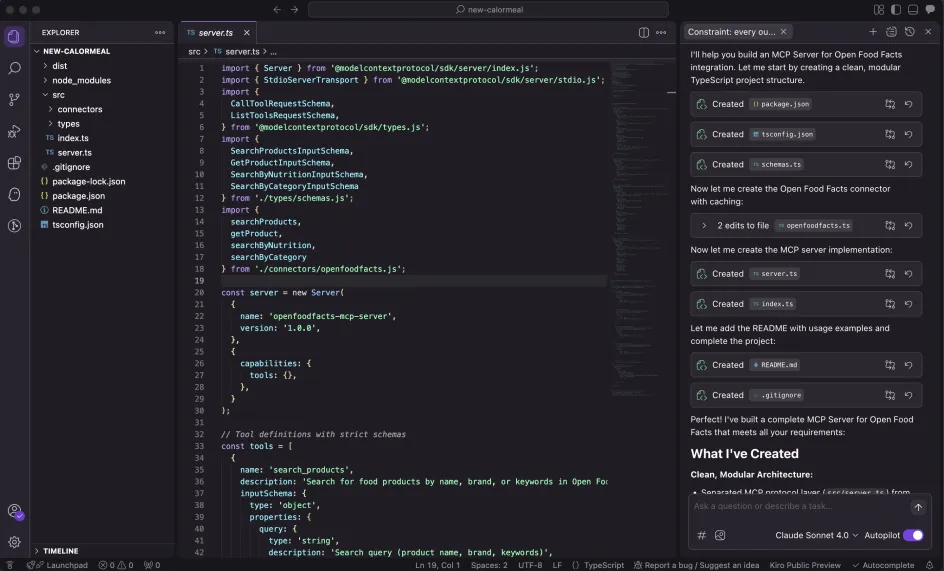
Client MCP
Now we need the client MCP to communicate with the server. We have to create a .kiro folder in our project and inside define a file called mcp.json with this content:
		{
          "mcpServers": {
            "calormeal": {
              "command": "node",
              "args": ["/Users/myUser/projects/new-calormeal/build/index.js"],
              "disabled": false,
              "autoApprove": ["search_products", "get_product", "search_by_nutriti>, "search_by_category"]
            }
          }
        }
Here you can see Kiro's screen with an MCP Server.
Trying it out
Now we can ask our server something, like this:
I ate 2 organic eggs from Carrefour. How much protein did I consume?
This is the result:
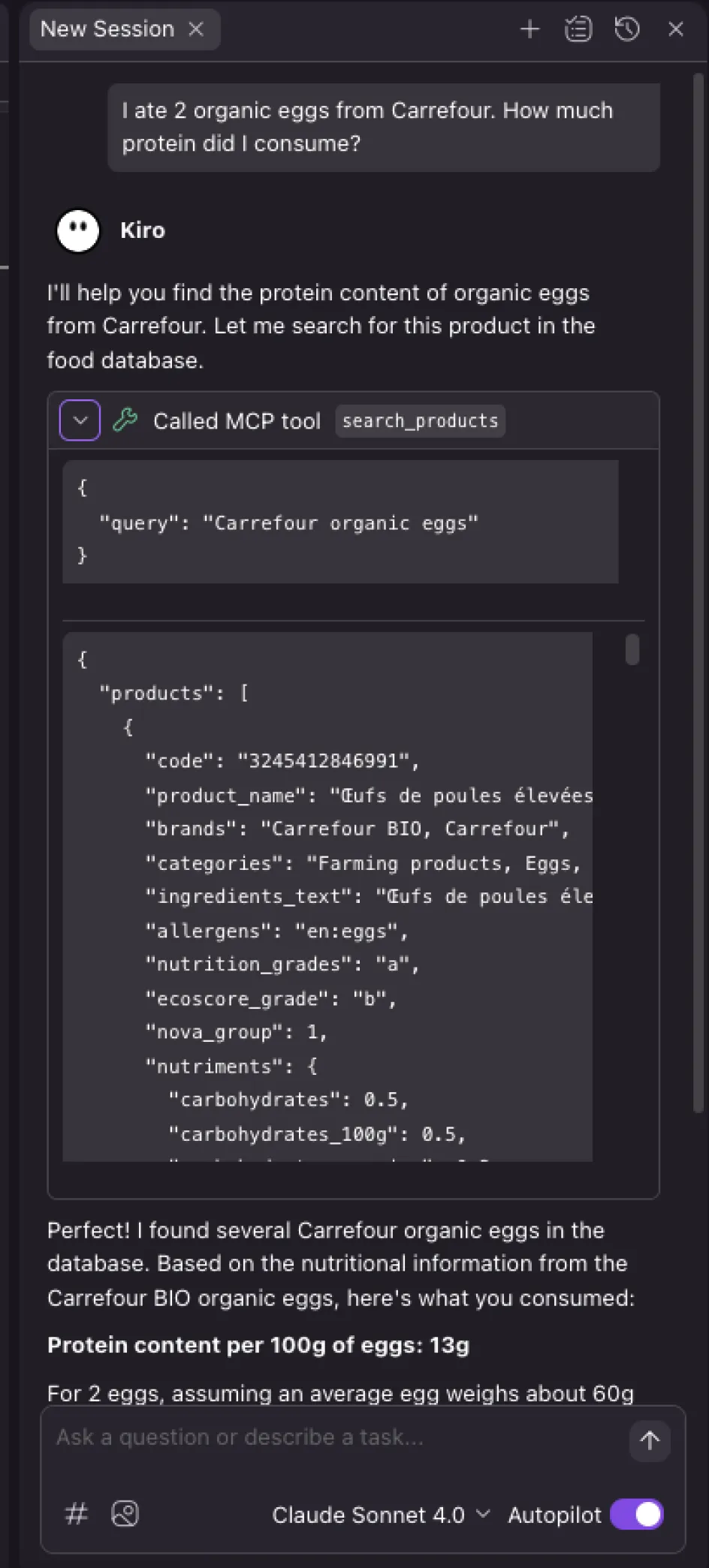
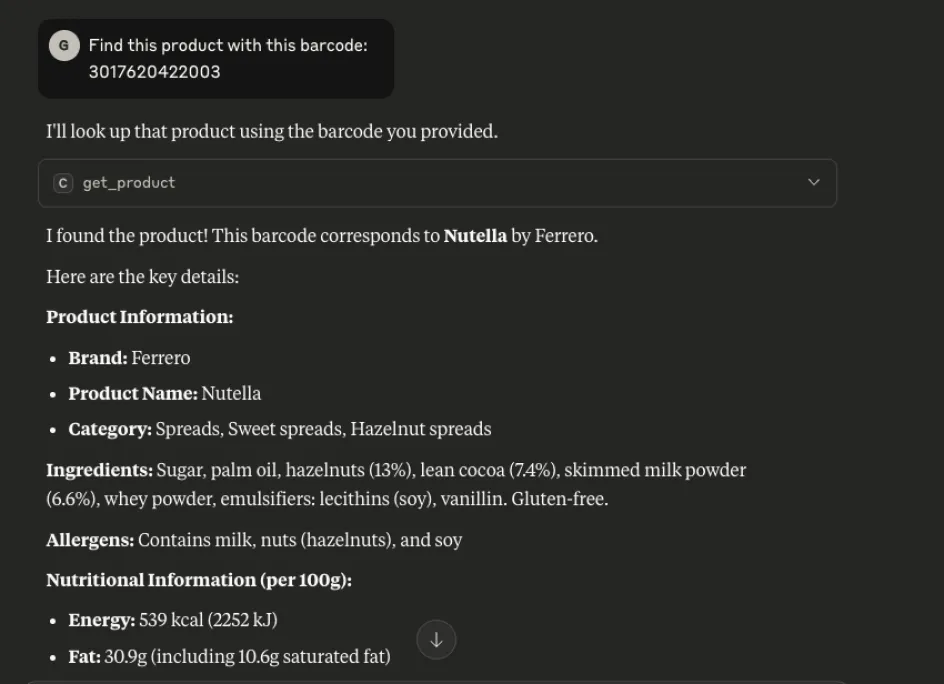
As you can see, in the response from the MCP Server, the response does not come from Claude's model, but instead calls our server, which in turn calls the Open Food Facts API and returns the information according to the structure we have defined.
The code
We have an openfoodfacts.ts file that defines a direct interface with the openfoodfacts API. We have for example, the searchProduct function.
		export const searchProducts = async (input: SearchProductsInput): Promise => {
          const cacheKey = `search:${JSON.stringify(input)}`;
          const cached = getCached(cacheKey);
          if (cached) return cached;

          try {
            const params = new URLSearchParams({
              search_terms: input.query,
              page: input.page?.toString() || '1',
              page_size: input.page_size?.toString() || '20',
              sort_by: input.sort_by || 'popularity',
              json: '1'
            });

            const url = `https://${input.lang || 'world'}.openfoodfacts.org/cgi/search.pl?${params}`;
            const response = await fetch(url);

            if (!response.ok) {
              return createError(
                `API request failed with status ${response.status}`,
                'Check your network connection and try again with a simpler query'
              );
            }

            const data = await response.json() as any;

            const result: ProductListResponse = {
              products: (data.products || []).map(normalizeProduct),
              count: data.count || 0,
              page: input.page || 1,
              page_size: input.page_size || 20,
              source: 'openfoodfacts'
            };

            setCache(cacheKey, result);
            return result;

          } catch (error) {
            return createError(
              `Network error: ${error instanceof Error ? error.message : 'Unknown error'}`,
              'Verify your internet connection and ensure the query contains valid characters'
            );
          }
        };
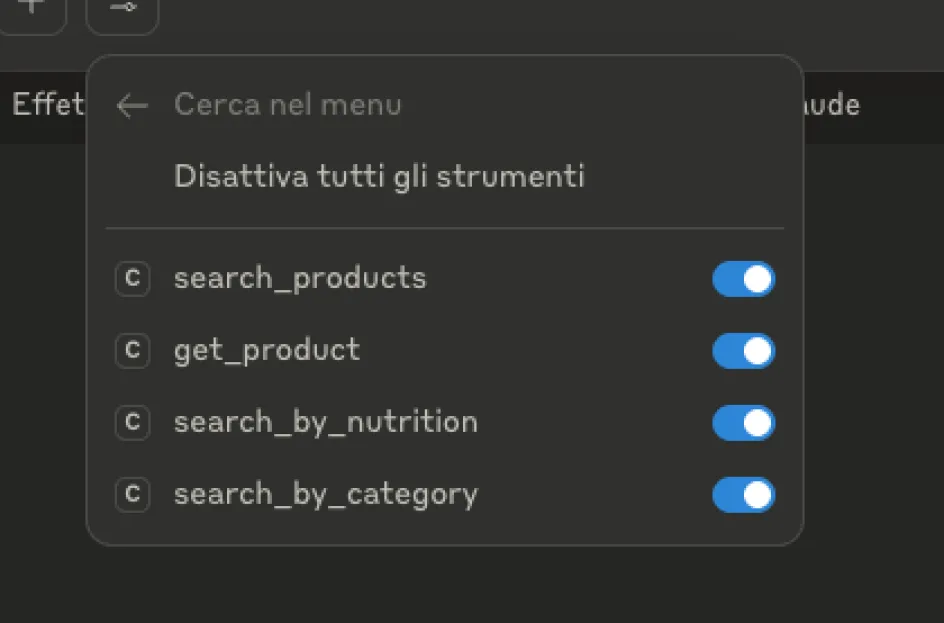
The server.ts defines an MCP server, and there are 4 registered tools:
- search_products - General search by name/brand
- get_product - Product details via barcode
- search_by_nutrition - Filter by nutritional values
- search_by_category - Search by food category
and then:
- ListToolsRequest - Returns a list of available tools
- CallToolRequest - Runs the requested tool with input validation
Here we define the server:
		import { Server } from '@modelcontextprotocol/sdk/server/index.js';

        const server = new Server(
          {
            name: 'openfoodfacts-mcp-server',
            version: '1.0.0',
          },
          {
            capabilities: {
              tools: {},
            },
          }
        );
And then we define the tools for each action like this:
	const tools = [
      {
        name: 'search_products',
        description: 'Search for food products by name, brand, or keywords in Open Food Facts database',
        inputSchema: {
          type: 'object',
          properties: {
            query: {
              type: 'string',
              description: 'Search query (product name, brand, keywords)',
              minLength: 1
            },
            lang: {
              type: 'string',
              description: 'Language code (en, fr, es, de, etc.)',
              default: 'en'
            },
            page: {
              type: 'number',
              description: 'Page number for pagination',
              minimum: 1,
              default: 1
            },
            page_size: {
              type: 'number',
              description: 'Number of results per page',
              minimum: 1,
              maximum: 100,
              default: 20
            },
            sort_by: {
              type: 'string',
              enum: ['product_name', 'popularity', 'created_t'],
              description: 'Sort results by field',
              default: 'popularity'
            }
          },
          required: ['query']
        }
      },
    /* [other tools] */
Here, the setRequestHandler associates a handler function with a specific request type:
- Pattern matching – When a request matches the schema, the function is executed
- Two registered handlers:
ListToolsRequestSchema → returns the list of available tools CallToolRequestSchema → executes a specific tool, as seen below:
		server.setRequestHandler(ListToolsRequestSchema, async () => ({
          tools
        }));

        server.setRequestHandler(CallToolRequestSchema, async (request) => {
          const { name, arguments: args } = request.params;

          try {
            switch (name) {
              case 'search_products': {
                const input = SearchProductsInputSchema.parse(args);
                const result = await searchProducts(input);
                return {
                  content: [
                    {
                      type: 'text',
                      text: JSON.stringify(result, null, 2)
                    }
                  ]
                };
              }

        ...
         /* [other cases] */
And finally, we run the server:
		export const runServer = async (): Promise => {
          const transport = new StdioServerTransport();
          await server.connect(transport);
          console.error('Open Food Facts MCP Server running on stdio');
        };
Using Claude Desktop
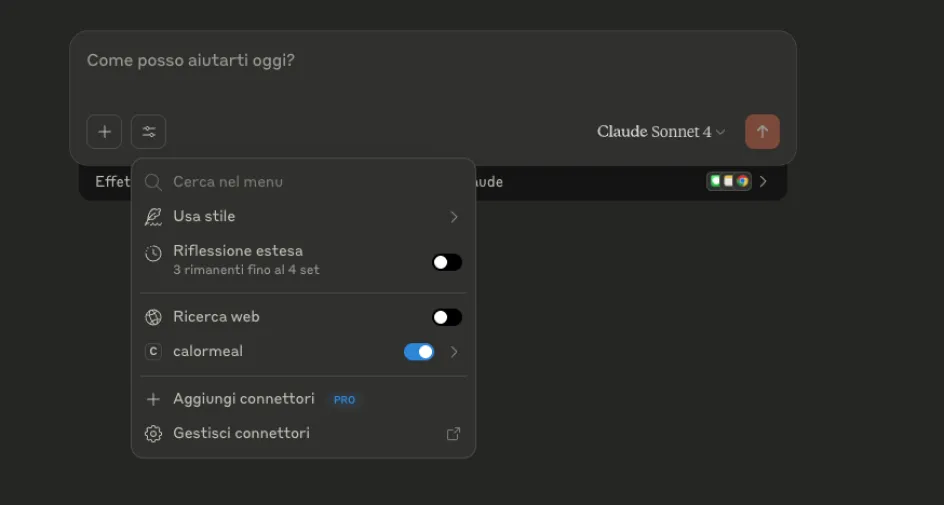
You can also use the Claude desktop app. Just configure this file claude_desktop_config.json
Then run the application, and under settings, you can find the MCP, as seen below:
And then find the functions we have built:
The result is:
Congratulations! If you followed these steps completely, you have just built your first MCP server using vibe coding. If you haven't and you want a headstart, you can find a lot of servers here (official and unofficial).